
New Year, New Browser Tabs
Start your new year with a gift to yourself: clean browser tabs!

a woman wearing a pink long-sleeve shirt holding an iPhone
If you know from experience that the iPhone’s Safari tab limit is 500, you’re likely aware how keeping so many tabs open can strain your device and workflow.
But we don’t always think about how hard it is on our brain to have all those ¯_(ツ)_/¯ open loops in our left-open tabs. Often pulling us as though we should be doing something with them.
Why it sucks to leave too many tabs open
- The “might want sometime but maybe will never need” items camouflage the “actually important and relevant” items until it all becomes a big pile of avoidance.
- Once the buildup of “stuff” starts to grow, we’re increasingly likely to add more and more without addressing any, because “Well, what’s a little more? The pile is already enormous.”
- Whenever we vaguely feel like we “should do something about that” buried, but don’t know exactly where, what, or how much work it will be to resolve, our brain has this lovely habit of blowing it out of proportion. It can feel like a 10-minute task will take 3 hours, so we put it off.
- Computing issues? (Slow response time, difficulty navigating due to small text size?)
- There is a constant, nagging sense that this area of our lives needs to be resolved. But it’s never urgent enough to do now. That is a psychological weight that, while not intense, can wear us down over time.
We build up a tremendous pile of task and “should” debt with so many tabs open.

a woman sitting at her desk, resting her head in her hands. She has her laptop, phone, and planner open on her desk
But it’s so easy to leave tabs open:
- “I’ll do this task/read this thing later.”
- “Open” feels like “saved,” even if it’s not always reliable.
- Deciding what a tab means (task? reading? reference? shopping? old guilt task?) is both hard and undervalued
- Tabs seem like a low-friction “capture tool”, even if they get less usable with more open tabs.
- We get pulled away to something else before we finish it.
- Our scarcity-brain sneaks in: “What if I can’t find this again?”
- Mess attracts mess: The more we have open, the harder it is to realize we’re leaving more open.
- We just don’t think about leaving that tab open when we move on to the next thing.
- We want quick access later. (Maybe try pinned tabs, tab groups or, even shudders bookmarks?)
Leaving tabs open is not a trusted system
- Sometimes we leave tabs open because we intend to come back to them, sometimes they’re just left open. So some are intentional, and some are forgetful. That makes our tabs a mixed ball of “blech” that we can quickly go numb to, while also feeling guilt over them. These seemingly random tabs can be things like:
- That funny link your friend sent
- The obligatory Zoom mtg tabs
- That thing you wanted to finish applying to
- That article you will read “someday.”
- Devices aren’t 100% reliable at keeping the tab you want open. If it gets full or a new link is similar, your open tab could be co-opted by a new page.
- Or the browser or device could crash
- it’s easy to think we’ll get to things “later” and pile on the debt for our future self
a note pad with a red sticker reading "don't forget."
If it’s really important, we need to pull the information out and put it with the other things we actually need to do.
The Unsexy Truth
We want to do something with all of those open tabs. We want to be the person who did all those things. But the unsexy truth is that sometimes our forgetfulness—or a browser crash—saves us from our own overly ambitious goals.
Unlike tasks in a system (for those folks with a system), we don’t ever look at them mindfully to decide what to take on now, put on hold, or drop entirely. We can’t see them together and compare, “Oh, I totally can’t do all that in the next month with everything else I’ve got going on!” While that process does take discipline and practice (and isn’t in the cards for everyone-- don’t beat yourself up!), it’s also very time and attention-consuming.
That’s why I say sometimes those fleeting “I want to” or “I should” things are actually better forgotten (either biologically or technologically).
Most of the important ones come back to us. It might come back with a cost, but it’s the same cost as if it’s lost in a sea of tabs where I can’t tell what’s really important.
Should we auto-close tabs? 😱
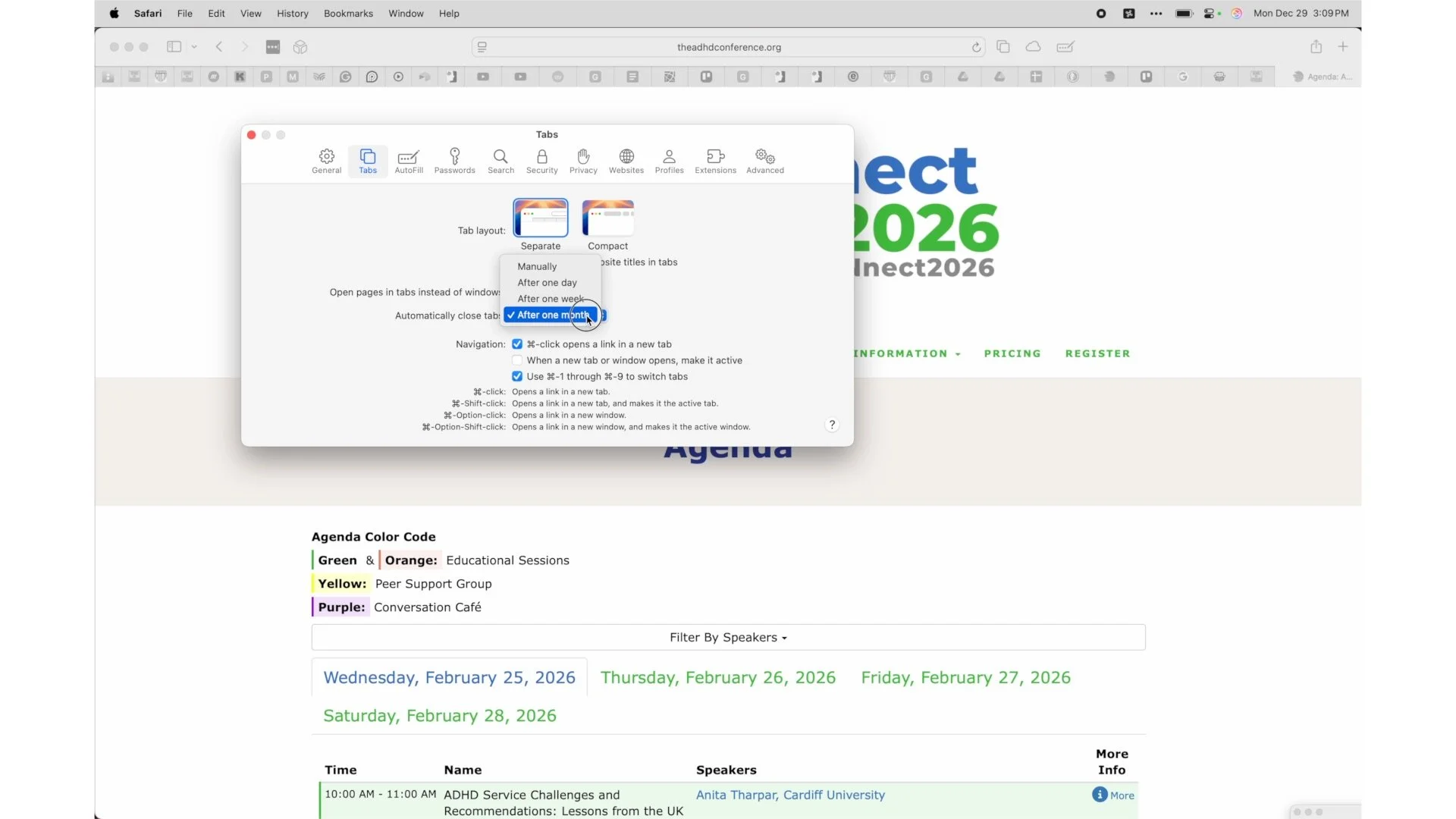
a screenshot showing the tabs setting
There’s a lot of historical feelings of loss and anxiety around mass-closing tabs. It’s very natural and understandable from an evolutionary standpoint. What if that resource were a potential food source?
But in our modern world of resource and information abundance, those instincts rarely serve us. (But we sure will hold on to that one time it did! 😜)
Often, if we know that there’s a limited time to act on a given item, we’re more likely to do so in a timely manner. If I open a tab that I’m really committed to acting on, I need to put it somewhere to keep it or stop and act on it now.
I’ve personally found it tremendously useful to auto-close tabs on my iPhone and iPad for years. There’s a knowledge that if I don’t deal with it now, it will be gone later, so I’d better finish something important.
This is often de facto true even without auto-closing tabs. How often have we actually gone back to read that article or do that task because the tab reminded us? Is it even as high as 5%? But without the knowledge that we can’t run into it later, it’s harder to lie to ourselves that we will. At least I have been better at handling things “now” with this feature on.
Although this feature has been on iPhone for some time, it only fairly recently came to the Mac in Sonoma.
Watch the Companion Video:
Check out the video on how to close tabs in Safari
Closing browser tabs in Chrome/Firefox
There’s an extension called Tab Wrangler (Chrome/Firefox) that automatically closes idle tabs and keeps a reopen list. The reopen list would probably be easier on the anxiety some feel about closing tabs en masse. The downside is that the list can become another guilty graveyard if we let it.
Alternatives to Auto-close
- Weekly “tab cleanup” appointment with yourself
- Something you do when you’re cranky or avoiding something else (but it can turn into a rabbit hole!)
- A daily habit of capturing what's actually important to do in another system
How do you keep your tabs under control? Or do you? What’s your relationship to browser tabs? Let us know!
—Brittany and Ollie